NEET PG 2026 Application Form: Registration Process, Documents, Image Guidelines & Important Dates
Jul 21, 2026
The NEET PG 2026 application form is the first step towards admission to MD, MS, PG Diploma, and DNB courses in India. Every year, thousands of candidates make avoidable mistakes while filling out the application form, such as entering incorrect personal details, uploading non-compliant images, or making payment errors. These mistakes can delay the application process or even lead to rejection.
To help you avoid such issues, this guide explains the complete NEET PG 2026 application process based on the official NBEMS Information Bulletin. It covers eligibility, registration, documents required, image upload guidelines, payment, edit window, and important precautions that every candidate should know before applying.
Quick Look
The NEET PG 2026 Application Form will be available only through the official National Board of Examinations in Medical Sciences (NBEMS) website. Candidates must register by creating a User ID and Password, fill in personal and academic details, upload the required images and documents, select preferred test states, pay the examination fee online, review the application, and submit it before the deadline.
Why Is the NEET PG Application Form Important?
The application form serves as your official record throughout the admission process. The information provided is used for:
- Identity verification
- Exam centre allocation
- Admit card generation
- Result declaration
- Counselling registration
- Admission verification
- Official communication from NBEMS
Since several details cannot be edited after registration, candidates should verify every entry before submission.
Download NEET PG Previous Year Question Papers PDF For Free

NEET PG 2026 Application Process at a Glance
Stage What You Need to Do User Registration Create User ID & Password. If you enter the wrong name while creating your User ID, do not proceed. Create a new User ID with the correct name because the name cannot be edited later. Application Form Fill in personal and academic details Upload Images Photograph, Signature & Left Thumb Impression Test State Selection Choose three preferred test states Fee Payment Pay examination fee online Preview Verify all details Final Submission Submit application and download confirmation Edit Window Correct permitted fields Image Scrutiny Re-upload images if notified
Also Read: NEET PG 2026: Exam Dates, Syllabus, Pattern, Registration, Eligibility, Preparation Tips
Who Can Apply?
Candidates must satisfy the eligibility criteria prescribed by NBEMS before submitting the application.
Generally, applicants should possess:
- MBBS degree or provisional pass certificate
- Permanent or provisional medical registration certificate
- Completion of compulsory rotatory internship on or before the prescribed cut-off date
- Eligibility as notified by NBEMS
Foreign Medical Graduates (FMGs), OCI candidates, NRIs, and Foreign Nationals should carefully review the relevant eligibility conditions mentioned in the official Information Bulletin.

Before You Begin Registration
Keep the following documents and information ready before opening the application portal.
Documents Required
Document Required Recent passport-size photograph ✔ Real-time webcam photograph ✔ Signature ✔ Left thumb impression ✔ MBBS Degree/Provisional Certificate ✔ Internship Completion Certificate ✔ Permanent/Provisional Registration Certificate ✔ Government-issued Photo ID ✔ Active Email ID ✔ Active Mobile Number ✔
Having these documents ready beforehand helps complete the application smoothly and minimizes errors.
System Requirements Recommended by NBEMS
NBEMS recommends filling the application form using a desktop or laptop instead of a mobile phone.
For a hassle-free application process:
- Use the latest version of your web browser.
- Ensure a stable internet connection.
- Clear browser cache before starting.
PrepLadder Pro Tip: Complete the application during non-peak hours and preferably at least a week before the last date to avoid server congestion.
Step 1: Register on the NBEMS Portal
The first step is to create your online profile on the official NBEMS website.
Registration link - Click here
During registration, you will create:
- User ID
- Password
Once registration is successful:
- Login credentials are sent to your registered email ID.
- An Application Sequence Number is generated.
- You can proceed to fill the application form.
Enter These Details Carefully
The following details entered during registration become part of your permanent profile:
- Candidate Name
- Email ID
- Aadhaar Number (if applicable)
- Mobile Number
- Nationality
These details should be entered exactly as per your official documents.
Non-Editable Fields
NBEMS has clearly stated that the following details cannot be changed after registration.
| Field | Editable Later? |
| Candidate Name | No |
| Email ID | No |
| Mobile Number | No |
| Aadhaar Number | No |
| Nationality | No |
| Correspondence Address | No |
| Preferred Test States | No |
Before clicking Register, verify every detail carefully.
Email & Mobile Number Guidelines
Your registered email ID and mobile number will be used throughout the admission process for:
- Registration confirmation
- Admit card notifications
- Image deficiency alerts
- Official announcements
- Counselling-related communication
Candidates should:
- Use a personal email ID.
- Keep the mobile number active throughout the admission process.
- Check the Spam/Junk folder regularly.
- Ensure sufficient email storage space.
Also Read: DNB or MD/MS: Comparing Career Growth and Opportunities
Step 2: Fill the Application Form
After registration, log in using your credentials and click "Go to Application."
The application form requires:
Personal Details
- Father's Name
- Mother's Name
- Gender
- Date of Birth
- Category
- PwBD Status (if applicable)
- Correspondence Address
- Permanent Address
Academic Details
Candidates will need to provide:
- MBBS College
- University
- Year of Passing
- Internship Details
- Medical Registration Details
Always verify these details from the original certificates before submission.
Image Upload Guidelines
One of the most common reasons for application rejection is uploading incorrect images. NBEMS has introduced a detailed image scrutiny process, making it essential to follow all specifications carefully.
Candidates must upload:
- One real-time photograph captured using the system's webcam while filling the application form.
- One recent colour photograph, not older than three months.
- Signature
- Left thumb impression
Failure to upload compliant images or to correct them during the Edit Window or Selective Image Edit Window if notified may result in rejection of the application.
Also Read: Top Medical PG Colleges in India Accepting NEET PG Score
Photograph Requirements
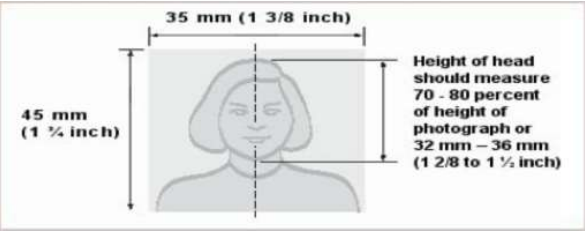
The uploaded photograph should:
- Be taken within the last three months.
- Be a colour photograph with a plain white background.
- Show the full face, ears, neck, and shoulders.
- Have a neutral expression with eyes looking directly at the camera.
- Cover 70–80% of the frame.
- Be in JPG/JPEG format.
- Be less than 80 KB.
- Not be digitally enhanced or retouched.
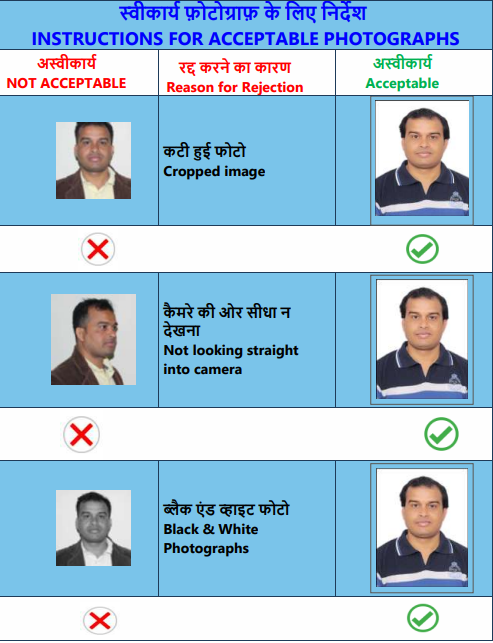
Avoid the Following
- Selfies
- Black-and-white photographs
- Caps or sunglasses
- Jewellery or heavy makeup
- Stethoscope around the neck
- Poor lighting
- Objects or people in the background
- Cropped or blurred photographs
- Photographs older than three months
Important: If there is a significant difference between the real-time webcam photograph and the uploaded recent photograph, NBEMS may reject the application.
Signature & Thumb Impression
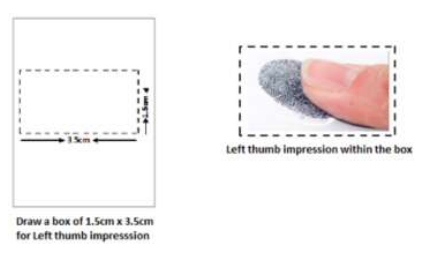
Candidates must upload:
- Signature inside a 3.5 cm × 1.5 cm box.
- Complete signature (not initials).
- Black or dark blue ink.
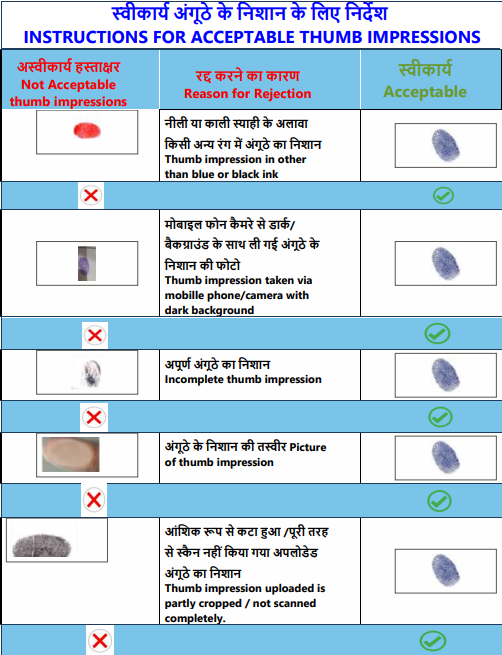
- Left thumb impression using blue or black ink.
- Images in JPG/JPEG format.
- File size below 80 KB.
Common reasons for rejection include:
- Signature outside the box
- Initials instead of full signature
- Entire page uploaded instead of cropped signature
- Smudged thumb impression
- Wrong ink colour
- Photograph uploaded in place of signature or thumb impression.
PrepLadder Pro Tips
✔ Keep all documents ready before registration.
✔ Fill the form on a desktop or laptop.
✔ Double-check non-editable fields before registration.
✔ Use a professional studio photograph taken within the last three months.
✔ Ensure all uploaded images meet NBEMS specifications.
Step 3: Select Preferred Test States
A major update in NEET PG 2026 is the selection of three preferred Test States instead of directly choosing an examination city.
While filling the application form, candidates must select three preferred Test States in order of preference.
Important Rule
According to NBEMS, the first preferred Test State must match the state mentioned in your correspondence address. The remaining two preferences can be selected from the available states within the designated zones.
Example
If your correspondence address is in Andhra Pradesh, your preferences could be:
- Andhra Pradesh (Mandatory First Preference)
- Telangana
- Karnataka
The first preferred Test State must be the same as the state mentioned in your correspondence address.
How Are Test Cities Allotted?
NBEMS allocates examination cities based on:
- Administrative feasibility
- Infrastructure availability
- Operational requirements
Although every effort is made to allot a city within one of your preferred Test States, NBEMS does not guarantee a specific examination city or centre.
Step 4: Pay the Examination Fee
Once all details are entered, candidates must pay the prescribed examination fee through the online payment gateway available on the NBEMS portal.
| Category of Candidate | Examination Fee |
| General, OBC & EWS | ₹3,500/- |
| SC, ST & PwBD | ₹2,500/- |
Offline payment is not accepted.
Payment Status
After payment, always verify the payment status displayed in your application.
| Status | Meaning |
| S | Successful |
| F | Failed |
| Pending | Payment under processing |
Your application is considered complete only when the payment status shows "S" (Successful).
If Payment Is Pending
Sometimes banks take additional time to reconcile transactions. If your payment remains pending:
- If the payment status shows Pending, the transaction may still be under processing by your bank. Wait for the payment status to update before deciding whether another payment is required.
- Avoid making repeated payment attempts immediately.
- Check the payment status again after some time.
Duplicate Payment
If multiple successful payments are made for the same application:
- NBEMS retains only the prescribed examination fee.
- Additional payments are refunded.
- Refunds may take 2–3 months in exceptional cases.
PrepLadder Pro Tip: Complete your application—including payment—well before the last date to avoid server congestion and banking delays.
Step 5: Preview & Submit the Application
Before final submission, NBEMS allows candidates to preview the complete application.
Verify the following carefully:
- Name
- Date of Birth
- Internship details
- Medical registration details
- Uploaded images
- Preferred Test States
- Payment status
After verification:
- Accept the declaration.
- Submit the application.
- Download the application PDF.
- Save the payment receipt.
NBEMS advises candidates to preserve these documents until the entire admission process, including counselling, is complete.
Edit Window
Even after submitting the application, NBEMS provides an Edit Window to correct certain details.
However, not all fields can be modified.
Non-Editable Fields
The following details remain permanently locked:
- Candidate Name
- Email ID
- Mobile Number
- Aadhaar Number
- Nationality
- Correspondence Address
- Preferred Test States
Candidates should therefore verify these details carefully before registration.
Editable Fields
Depending on the official notification, candidates may be allowed to edit selected details such as:
- Category
- PwBD status
- Internship details
- Academic information
- Medical registration details
Always refer to the official NBEMS notification for the latest list of editable fields.
Selective Image Edit Window
Submitting the application does not guarantee that your uploaded images have been accepted.
After the application window closes, NBEMS reviews all photographs, signatures, and thumb impressions through an Image Scrutiny Process.
If any uploaded image does not meet the prescribed specifications:
- Candidates are informed through their registered email ID and applicant dashboard.
- They are allowed to upload corrected images during the Selective Image Edit Window.
- Failure to upload compliant images within the stipulated period may result in rejection of the application.
Common Reasons for Image Rejection
NBEMS may reject uploaded images for the following reasons:
Photograph
- Photograph older than three months
- Selfie
- Blurred or low-quality image
- Black-and-white photograph
- Poor lighting
- Cropped face
- Face not looking directly at the camera
- Objects or additional people in the background
- Sunglasses, cap, jewellery, or heavy makeup
- Body visible below the shoulders
Signature
- Initials instead of complete signature
- Signature outside the rectangular box
- Entire page uploaded instead of the cropped signature
- Wrong ink colour
- Photograph uploaded instead of signature
Thumb Impression
- Smudged impression
- Incomplete thumb print
- Wrong ink colour
- Photograph uploaded instead of scanned thumb impression
- Cropped thumb impression
Common Mistakes to Avoid
Every year, many applications are rejected because of simple errors. Avoid the following:
- Entering a name that does not match official MBBS records.
- Using an inactive email ID or mobile number.
- Uploading photographs older than three months.
- Waiting until the last day to register.
- Uploading incorrect or blurred images.
- Ignoring image deficiency notifications.
- Making repeated payment attempts unnecessarily.
- Forgetting to download the submitted application form.
A few extra minutes spent reviewing your application can prevent unnecessary complications later.
Frequently Asked Questions
1. Can I edit my name after registration?
No. The candidate name is a non-editable field once registration is complete.
2. Can I complete the application using a mobile phone?
NBEMS recommends using a desktop or laptop with the latest web browser for a smoother application experience.
3. What happens if my uploaded photograph is rejected?
NBEMS will notify you through your registered email ID and applicant dashboard. You can upload a corrected image during the Selective Image Edit Window.
4. What should I do if my payment fails?
Check the payment status on the application portal. If the amount has been debited but the status has not updated, wait for payment reconciliation before making another payment.
5. Should I keep a copy of the submitted application?
Yes. Download and preserve the application PDF and payment receipt until counselling and admission are completed.
Final Checklist Before Submission
Before logging out, ensure that you have:
- Registered successfully on the NBEMS portal.
- Entered all personal and academic details correctly.
- Uploaded a recent photograph, signature, and left thumb impression as per NBEMS guidelines.
- Selected three preferred Test States correctly.
- Completed online payment successfully.
- Verified that the payment status shows "S" (Successful).
- Previewed the complete application.
- Downloaded the application PDF.
- Saved the payment receipt.
- Checked your registered email for confirmation.
Conclusion
The NEET PG 2026 Application Form is the foundation of your postgraduate admission journey. A carefully completed application not only ensures smooth participation in the examination but also helps avoid unnecessary delays during counselling and admission.
Before submitting your application, verify all non-editable details, upload images exactly as per the NBEMS specifications, complete the payment successfully, and download the confirmation documents for future reference.
At PrepLadder, we recommend completing your application well before the deadline to avoid last-minute technical issues and give yourself enough time to focus on what matters most-your NEET PG preparation.

PrepLadder
Access all the necessary resources you need to succeed in your competitive exam preparation. Stay informed with the latest news and updates on the upcoming exam, enhance your exam preparation, and transform your dreams into a reality!
Navigate Quickly
Quick Look
Why Is the NEET PG Application Form Important?
Download NEET PG Previous Year Question Papers PDF For Free
NEET PG 2026 Application Process at a Glance
Who Can Apply?
Before You Begin Registration
Documents Required
System Requirements Recommended by NBEMS
Step 1: Register on the NBEMS Portal
Enter These Details Carefully
Non-Editable Fields
Email & Mobile Number Guidelines
Step 2: Fill the Application Form
Personal Details
Academic Details
Image Upload Guidelines
Photograph Requirements
Avoid the Following
Signature & Thumb Impression
PrepLadder Pro Tips
Step 3: Select Preferred Test States
Important Rule
How Are Test Cities Allotted?
Step 4: Pay the Examination Fee
Payment Status
If Payment Is Pending
Duplicate Payment
Step 5: Preview & Submit the Application
Edit Window
Non-Editable Fields
Editable Fields
Selective Image Edit Window
Common Reasons for Image Rejection
Photograph
Signature
Thumb Impression
Common Mistakes to Avoid
Frequently Asked Questions
1. Can I edit my name after registration?
2. Can I complete the application using a mobile phone?
3. What happens if my uploaded photograph is rejected?
4. What should I do if my payment fails?
5. Should I keep a copy of the submitted application?